
j5create USB Type C Docking Station with 100W PD Charger – Supports 3 Displays | HDMI, DisplayPort, VGA, 100W PD Charging, 1Gbps Ethernet | for MacBook Pro/Air, XPS, and More (JCD543P)
Original price was: $149.99.$127.99Current price is: $127.99.
j5create USB Type C Docking Station with 100W PD Charger – Supports 3 Displays | HDMI, DisplayPort, VGA, 100W PD Charging, 1Gbps Ethernet | for MacBook Pro/Air, XPS, and More (JCD543P)
Reviewed by Daniel – United States | Rating: ★★★★★ (5/5)
Introduction
The j5create USB Type C Docking Station (JCD543P) is an all-in-one solution for users who need to expand their laptop’s connectivity, power, and display capabilities. Designed with professionals and multitaskers in mind, it offers triple display support (HDMI, DisplayPort, VGA), 100W Power Delivery charging, 1Gbps Ethernet, and a range of essential ports.
Whether you’re using a MacBook Pro, MacBook Air, Dell XPS, HP Spectre, Lenovo ThinkPad, or other USB-C compatible laptops, this docking station transforms your device into a full desktop workstation. With remote work, content creation, and multitasking becoming increasingly common, a reliable dock like this is a must-have.
This review explores its design, functionality, performance, ease of use, pros and cons, and overall value.
Design & Build Quality
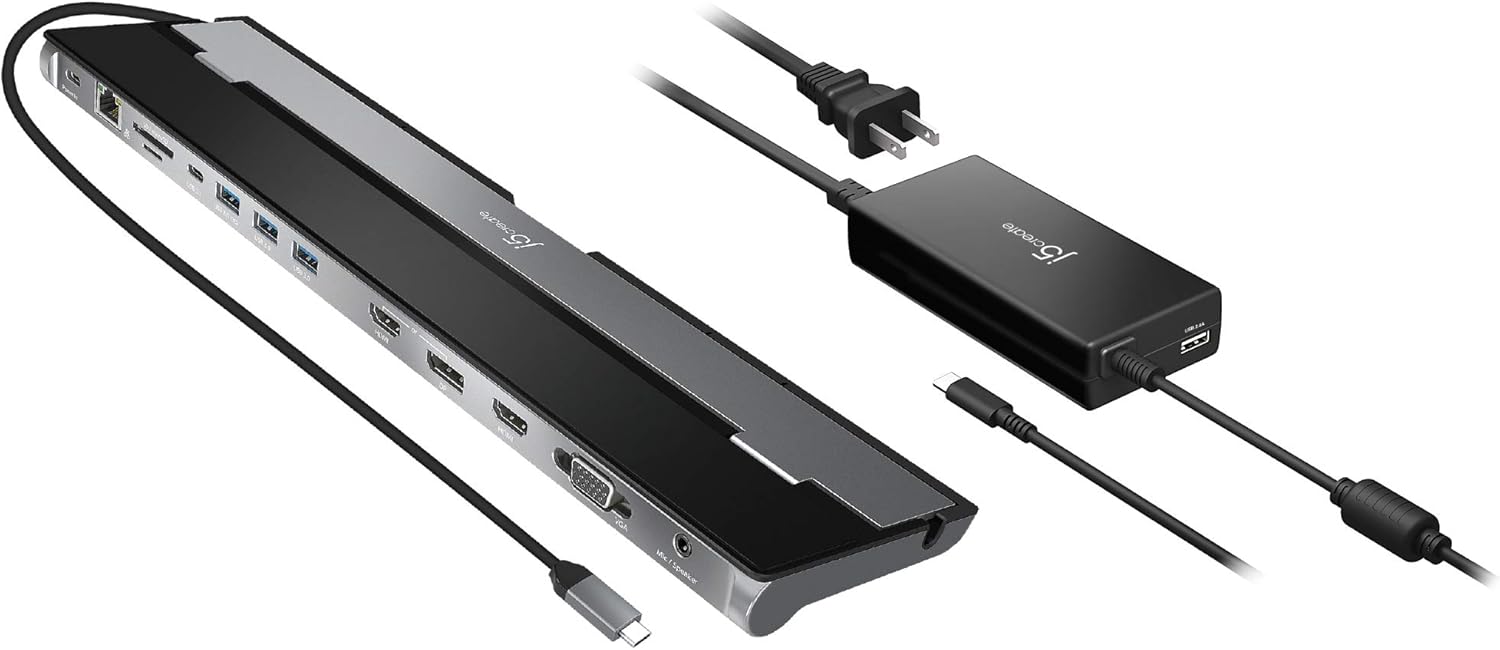
The JCD543P features a sleek aluminum housing, which not only looks premium but also enhances durability and helps with heat dissipation. Its compact form factor makes it perfect for portable setups or minimalist workspaces.
Key design highlights:
-
Slim rectangular body with clearly labeled ports
-
Aluminum casing for sturdiness and cooling efficiency
-
Integrated cable management to reduce desk clutter
-
Travel-friendly design that slips easily into laptop bags
Overall, it feels like a high-quality device built for daily use.

Connectivity & Ports
The docking station’s strength lies in its versatile port selection, which covers both modern and legacy devices.
Display Output Options
-
1 × HDMI (4K @ 30Hz)
-
1 × DisplayPort (4K @ 30Hz)
-
1 × VGA (1080p @ 60Hz)
This allows for triple display support, which is a standout feature for professionals working across multiple applications simultaneously.
Other Ports & Features
-
1 × USB-C Power Delivery (100W PD input) – Charges laptops while docking
-
2 × USB 3.1 Gen 1 Type-A – High-speed data transfer up to 5Gbps
-
1 × USB-C data port – For accessories and peripherals
-
1 × Gigabit Ethernet port – Stable wired internet
-
1 × 3.5mm Audio combo jack – For headsets and speakers
This wide array of ports ensures compatibility with both new devices and older accessories.

Power Delivery (100W Charging)
One of the major advantages of this docking station is its 100W Power Delivery (PD) support. Unlike weaker hubs that can’t keep up with high-performance laptops, the JCD543P provides full charging power while still running displays and peripherals.
-
MacBook Pro 16-inch users can charge their device at full speed
-
Supports high-demand ultrabooks and Windows laptops
-
Ensures laptops won’t drain battery while multitasking on multiple monitors
For users who rely on their laptop as their primary workhorse, this feature is invaluable.
Multi-Display Performance
The docking station is designed to boost productivity by allowing users to connect up to three external monitors simultaneously.
-
HDMI + DisplayPort + VGA combination offers flexibility for both modern and legacy monitors
-
Ideal for graphic designers, video editors, stock traders, and programmers who thrive with multiple screens
-
4K resolution at 30Hz ensures crisp visuals (though high-refresh gamers may prefer 60Hz solutions)
-
Extended and mirror modes are supported across macOS and Windows
While macOS has some limitations with multi-display support, Windows laptops take full advantage of the triple monitor setup.

Network & Audio Features
The built-in 1Gbps Ethernet port is perfect for users who require low-latency, stable connections for video calls, streaming, or online work. Compared to Wi-Fi, it ensures faster and more reliable performance.
The 3.5mm audio jack allows users to connect headphones, speakers, or microphones, making it suitable for conference calls and content creation.
Ease of Use & Compatibility
The JCD543P is plug-and-play for most modern laptops. Users simply connect it to their USB-C port, and the dock is ready to go without complicated driver installation.
-
Compatible devices: MacBook Pro, MacBook Air, Dell XPS, HP Spectre, Microsoft Surface, Lenovo ThinkPad, Chromebooks, and more
-
Operating systems supported: macOS, Windows, ChromeOS, Linux (with varying multi-display capabilities)
-
No external power brick needed, as it draws power from the connected laptop’s charger
This makes setup quick and hassle-free, especially for users switching between devices.

Performance & Daily Use
The docking station excels in real-world scenarios:
-
Office work: Easily manage emails, documents, and presentations across three displays
-
Creative work: Video editors can run timelines on one screen, previews on another, and tools on the third
-
Remote work: Seamlessly handle video calls, chat apps, and productivity software simultaneously
-
Education & research: Students and researchers benefit from multiple screens for research, note-taking, and presentations
Its stable connections, strong build, and seamless integration make it a reliable daily driver.
Pros
-
Supports triple display output (HDMI, DP, VGA)
-
100W Power Delivery for full laptop charging
-
Sturdy aluminum build with premium design
-
Wide port selection for both modern and legacy devices
-
Compact and travel-friendly design
-
Plug-and-play compatibility with most OS
-
Reliable 1Gbps Ethernet for stable internet
-
Excellent solution for remote workers, creatives, and multitaskers
Cons
-
4K output limited to 30Hz (not ideal for high-refresh gaming)
-
macOS has restrictions on extended triple display support
-
Price may be higher compared to simpler USB-C hubs
-
No SD or microSD card reader (would have been useful for creators)
Who Should Buy It
The JCD543P is best suited for:
-
Remote workers and professionals who rely on multiple monitors
-
Students and educators needing a compact workstation
-
Business travelers who require a lightweight, portable docking solution
-
Content creators who use external monitors for editing, previewing, and multitasking
It’s less ideal for:
-
Gamers who need 4K @ 60Hz refresh rates
-
Users who only require basic USB-C hubs with fewer ports

Final Verdict
The j5create USB Type C Docking Station with 100W PD Charger (JCD543P) is an outstanding option for anyone who needs to transform their laptop into a powerful workstation. With support for triple displays, high-speed data transfer, Gigabit Ethernet, and full laptop charging, it combines versatility and performance in a sleek, portable package.

While not intended for hardcore gaming or users who demand 4K @ 60Hz on all outputs, it is perfect for professionals, remote workers, and students who need a reliable docking solution with excellent connectivity.
For its mix of features, design quality, and daily performance, it represents exceptional value in its category.
Reviewed by Daniel – United States | Rating: ★★★★★ (5/5)